Realistic Party Balloon Photoshop Mockup: When Detail and Flexibility Matter Most
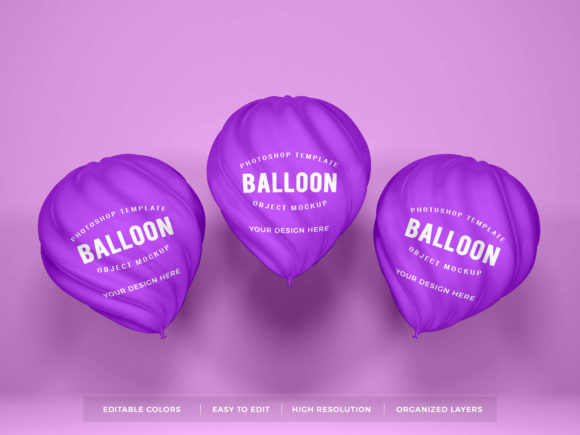
A Realistic Party Balloon Photoshop Mockup is a professionally designed PSD file that simulates how custom balloon designs—logos, text, patterns, or illustrations—appear on actual inflated latex or foil balloons, rendered with accurate lighting, material texture, curvature, shadows, and environmental context. Unlike basic flat templates or generic vector placeholders, it leverages layered smart objects, realistic surface distortion, and physics-informed shading to reflect how light interacts with glossy, stretched, or slightly wrinkled balloon surfaces. The “realistic” designation isn’t marketing jargon—it signals intentional fidelity to real-world behavior: subtle reflections, gentle gradient falloffs, soft cast shadows on surfaces like wood tables or concrete floors, and even slight perspective warping consistent with spherical geometry.
How It Differs From Other Visual Presentation Tools
Many designers reach for alternatives without fully weighing tradeoffs. A standard balloon vector template offers quick drag-and-drop placement but lacks depth perception—text sits unnaturally flat, with no convincing stretch or highlight variation across the curve. A 3D balloon render may look impressive in isolation but often locks users into fixed angles, lighting setups, or color schemes, limiting reuse across multiple client concepts. Meanwhile, stock photo overlays provide realism but sacrifice customization: you can’t easily swap out branding, adjust balloon size relative to background elements, or match exact Pantone colors without complex masking and blending.
In contrast, a Realistic Party Balloon Photoshop Mockup balances control and authenticity. Its layered structure lets you replace artwork via smart object layers while preserving realistic deformation, lighting, and shadow relationships. You’re not just pasting onto a photo—you’re compositing into a responsive, editable scene where scale, angle, and ambient tone remain consistent and adjustable.
Strengths That Support Real-World Workflows
The core value of a Realistic Party Balloon Photoshop Mockup emerges most clearly in client-facing scenarios where credibility and clarity matter. For example, a party planner pitching a branded baby shower concept can show how a custom “Welcome Little One” design wraps naturally around a 12-inch helium balloon—complete with realistic gloss highlights near the top and softened contrast near the knot—rather than presenting a flat, geometrically implausible version. Similarly, a small-batch balloon decorator using Instagram to showcase seasonal collections benefits from mockups that convey tactile quality: the slight translucency of thin latex, the matte sheen of biodegradable foil, or how metallic accents catch light at different angles.
Another practical strength lies in iteration speed. Because lighting, background, and camera perspective are pre-configured and non-destructive, you can test multiple logo variations—different fonts, sizes, placements (centered vs. off-axis), or color combinations—in under two minutes per version. This supports rapid A/B testing with stakeholders without requiring new photography sessions or 3D modeling expertise.
Tradeoffs Worth Acknowledging
No tool excels in every context—and understanding limitations helps avoid misapplication. A Realistic Party Balloon Photoshop Mockup assumes familiarity with Photoshop’s layer system and smart object workflow. Beginners may find initial setup slower than drag-and-drop online generators, especially when adjusting perspective or matching ambient light to existing brand assets. Also, while high-quality mockups include multiple balloon types (e.g., chrome foil, confetti-filled latex, organic-shaped mylar), they rarely cover *every* niche variant—think heart-shaped foil balloons with double-layered printing or oversized 36-inch parade balloons. In those cases, the mockup serves best as a strong starting point—not an absolute substitute for physical proofing.
Resolution and output flexibility are another consideration. Most well-made mockups deliver print-ready 300 DPI renders at common sizes (e.g., 4x6”, 8x10”), but scaling beyond native dimensions risks visible pixelation in highlights or fine texture details. If your use case demands ultra-large-format display (e.g., trade show backdrops), you’ll likely need supplemental retouching or higher-resolution source files—something worth verifying before purchase.
Fitting the Right Use Case
A Realistic Party Balloon Photoshop Mockup shines when your priority is balancing visual credibility with creative control. It’s especially well-suited for:
- Brand identity presentations—where consistency across touchpoints (balloons, invitations, cake toppers) must feel cohesive and physically plausible;
- E-commerce product visualization—helping customers anticipate how custom-printed balloons will look in real settings, reducing returns due to expectation mismatch;
- Proposal decks and pitch materials—providing polished, professional visuals without hiring a photographer for every concept iteration;
- Social media content creation—enabling consistent, on-brand visuals for campaigns tied to holidays, launches, or milestones.
It becomes less ideal when speed trumps nuance—like generating dozens of quick social thumbnails for internal brainstorming—or when your audience expects photorealism so precise that minute imperfections (e.g., micro-wrinkles in foil, air bubbles in latex) must be replicated exactly. In those situations, a curated set of high-res studio photos or a custom photoshoot may justify the added time and cost.
Comparing Approaches: What Else Is on the Table?
Choosing among options isn’t about “best” versus “worst”—it’s about alignment with goals, resources, and audience expectations. Consider these realistic comparisons:
- Custom photography: Highest fidelity and full control over props, lighting, and styling—but requires access to balloons, a clean studio space, lighting gear, and post-processing time. Cost-effective only at scale or for flagship campaigns.
- Online mockup generators: Fast, browser-based, and often free or low-cost—but typically offer limited realism, fixed backgrounds, and minimal control over lighting direction or material response. Best for rough ideation, not final delivery.
- Illustrative or stylized mockups: Useful for playful, brand-aligned visuals (e.g., watercolor textures, line-art balloons)—but intentionally depart from realism. Appropriate for mood boards or conceptual work, not production handoffs.
- 3D modeling tools (e.g., Blender, Cinema 4D): Maximum flexibility for dynamic scenes, animation, or unconventional balloon shapes—but steep learning curve and significant time investment per render. Justified only if you regularly produce animated reels or need photoreal 360° views.
A Realistic Party Balloon Photoshop Mockup occupies a pragmatic middle ground: more adaptable than stock photos, more grounded than vector templates, more accessible than 3D workflows, and more controllable than automated generators.
Making Your Decision With Confidence
Before selecting a Realistic Party Balloon Photoshop Mockup, ask three questions:
- What’s the primary goal? If it’s client approval, e-commerce conversion, or brand guideline documentation, realism and consistency are critical—and this format delivers reliably.
- What’s your editing comfort level? If you regularly use Photoshop for compositing, layers, and smart objects, the learning curve is minimal. If you rely mostly on Canva or mobile apps, consider whether the time investment pays off for your typical project volume.
- What’s the expected lifespan of the asset? Well-structured mockups are reusable across years and clients—especially if they include multiple balloon types, neutral backgrounds, and organized layer groups. That reusability often offsets the upfront cost faster than it appears.
Ultimately, a Realistic Party Balloon Photoshop Mockup isn’t a shortcut—it’s a precision instrument. It won’t replace thoughtful design decisions or physical prototyping, but it does remove ambiguity between concept and execution. When your work hinges on helping others visualize something intangible—joy, celebration, personalization—clarity isn’t optional. It’s the first step toward trust.