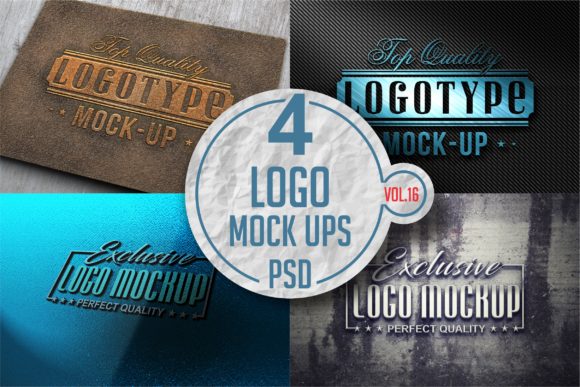
Logo Mock-up Pack 16
Logo Mock-up Pack 16 isn’t just another collection of placeholder scenes—it’s a tightly curated set of high-fidelity, context-aware mock-ups designed for designers and brand builders who need to show logos where they’ll actually live: on matte ceramic mugs, textured kraft packaging, minimalist business cards, and soft-touch fabric tags. The pack leans into tactile realism—subtle shadows, natural light falloff, and material-specific surface grain—so your logo doesn’t float in sterile white space but settles into place with quiet confidence.
A Design-First Approach to Brand Presentation
What sets Logo Mock-up Pack 16 apart is its restraint. No exaggerated reflections, no forced perspective distortion, no over-saturated backdrops. Instead, you’ll find neutral-toned environments—warm oatmeal paper, brushed aluminum signage, unbleached cotton tote bags—that let the logo breathe and communicate without visual competition. Each scene supports clarity over flash: the camera angle is eye-level or gently angled, lighting is diffused and directional (never flat), and depth-of-field is shallow but intentional—just enough to guide attention without blurring critical details like kerning or fine line work.
This realism serves a practical purpose: it helps clients and stakeholders imagine real-world application faster. When you present a logo on a mock-up from this pack, you’re not selling a concept—you’re showing a decision point. That matters whether you’re pitching to a boutique coffee roaster, refining a nonprofit’s visual identity, or prepping assets for a Shopify launch.
Where These Mock-ups Earn Their Keep
Logo Mock-up Pack 16 shines brightest where authenticity and intention intersect. Think editorial design: placing a refined serif logo on a letterpress-style book cover mock-up reinforces craftsmanship and legacy. For eco-conscious brands, the uncoated paper and recycled packaging variants communicate sustainability without saying a word. In social media graphics, the Instagram post and story templates keep branding consistent while respecting platform-native proportions and safe zones.
It also works well for hybrid use cases—like a small-batch candle maker who needs the same logo to feel at home on both a hand-stamped wooden box and a sleek website hero banner. The pack includes layered PSD files with smart objects, so swapping in your logo takes seconds—not minutes—and maintains proper scaling, alignment, and lighting interaction across formats.
Readability & Visual Hierarchy, Built In
Unlike generic mock-ups that treat all logos as interchangeable blobs, Logo Mock-up Pack 16 anticipates how type behaves in context. The business card layout respects minimum legibility thresholds—even at 8 pt, key text remains crisp thanks to thoughtful sizing and contrast balance. The apparel mock-ups position logos where garment seams and folds won’t obscure them. And the web UI variants include subtle UI elements (a navigation bar, subtle hover state) so you can demonstrate how the logo scales alongside interface typography and iconography.
This attention to hierarchy means less guesswork when evaluating whether your logo holds up across touchpoints. If it reads clearly on the textured notebook mock-up, it’ll likely hold up on printed stationery. If it balances well against the muted background of the podcast cover art template, it’s probably ready for digital thumbnails.
Choosing the Right Scene—Not Just the Prettiest One
Start by asking: what’s the first impression you need to land? A tech startup launching a SaaS dashboard might prioritize the clean laptop screen or dark-mode app interface mock-up—not the rustic wood sign. A children’s illustrator, on the other hand, may lean into the soft plush toy or pastel-colored sticker sheet to signal warmth and approachability.
Test your logo at actual size. Zoom out to 50%—does the shape still read? Does negative space hold up? Try toggling layers: some mock-ups include optional texture overlays or ambient light gradients. Use those sparingly—only when they reinforce, not distract from, your logo’s core structure.
Also consider workflow fit. All mock-ups are delivered as layered Photoshop files with non-destructive smart object placement, but if you primarily use Figma or Affinity Photo, check the included documentation for export tips and compatibility notes. Some scenes include alternate color variants (light/dark mode versions, warm/cool white backgrounds), which saves time when prepping for stakeholder review rounds.
Licensing That Matches Real-World Use
Logo Mock-up Pack 16 comes with an extended commercial license—meaning you can use it for client work, sell final designs that include these mock-ups (e.g., a full brand kit on Creative Market), and even embed them in pitch decks shared with investors. There’s no per-project fee or attribution requirement, but resale of the mock-ups themselves as standalone assets is prohibited. That’s standard—and fair—for premium design assets built for professional use.
If you’re a freelancer bundling mock-ups into a retainer package, or a publisher creating branded course materials, this licensing model removes friction. You’re not tracking usage caps or negotiating add-ons—you’re focusing on delivering clear, credible visual storytelling.
Pairing With Typography—A Quiet Partnership
While Logo Mock-up Pack 16 doesn’t include fonts, it’s designed to complement strong typographic choices. Its neutral staging makes it ideal for showcasing modern typography—think tight-kerned sans serifs for tech brands, delicate serifs for literary journals, or confident display fonts for craft breweries. Because the backgrounds don’t compete, your font pairing decisions stay visible and legible.
Try this quick test: drop your logo into the matte black poster mock-up, then layer in two font options—one for headlines, one for body text—using the same color palette. Does the hierarchy feel intuitive? Does the spacing between logo and supporting text reflect your brand’s voice (tight and efficient vs. open and contemplative)? The mock-up becomes a silent collaborator in that evaluation.
For content creators building personal brands—bloggers, newsletter writers, podcasters—this pack offers immediate polish. Swap your logo into the notebook, podcast cover, and email header mock-ups, and you’ve got a cohesive, professional suite ready for launch day. No need to hire a photographer or rent studio time. Just focus on what matters: your message, your voice, and how your logo anchors it all.